Instant
Transcription in under a second thanks to Apple’s Neural Engine. The model stays loaded in memory : zero wait.
Free forever plan · macOS
NeverTyping turns your voice into text in under a second, directly on your Mac. Start with 7 days of Pro free, with no credit card.
Built for flow first. You speak, the text appears — without friction.
Transcription in under a second thanks to Apple’s Neural Engine. The model stays loaded in memory : zero wait.
Everything happens on your Mac. No audio, no text sent over the internet. Your microphone stays yours.
Enable continuous mode : speak, pause, and it types and sends by itself. Perfect for long sessions.
Punctuation, capitalisation, filler words removed. Clean text, ready to send — without changing your meaning.
French, English, Spanish, Portuguese… Dictate in your language, or translate to English on the fly.
Mail, Slack, Notion, your browser, your code editor… If you can type there, you can dictate there.
Public mode isolates your voice from background noise — and your AirPods are detected automatically. Dictate in a café, a coworking space or an open office, without disturbing anyone.
Hover any text on screen — a message, an email, a website — and its translation appears in your language. 100% on-device, like everything else.
No window to open, no button to find. The gesture becomes a reflex.
Keep right‑click pressed (or your preferred key) from any app.
Dictate naturally. A subtle indicator confirms NeverTyping is listening.
The cleaned text is instantly pasted where your cursor is.
💡 Best with a mouse — hold right‑click and speak, it’s the most natural and fluid gesture. No mouse? F2, F3 or the 🌐 (fn) key do the job.
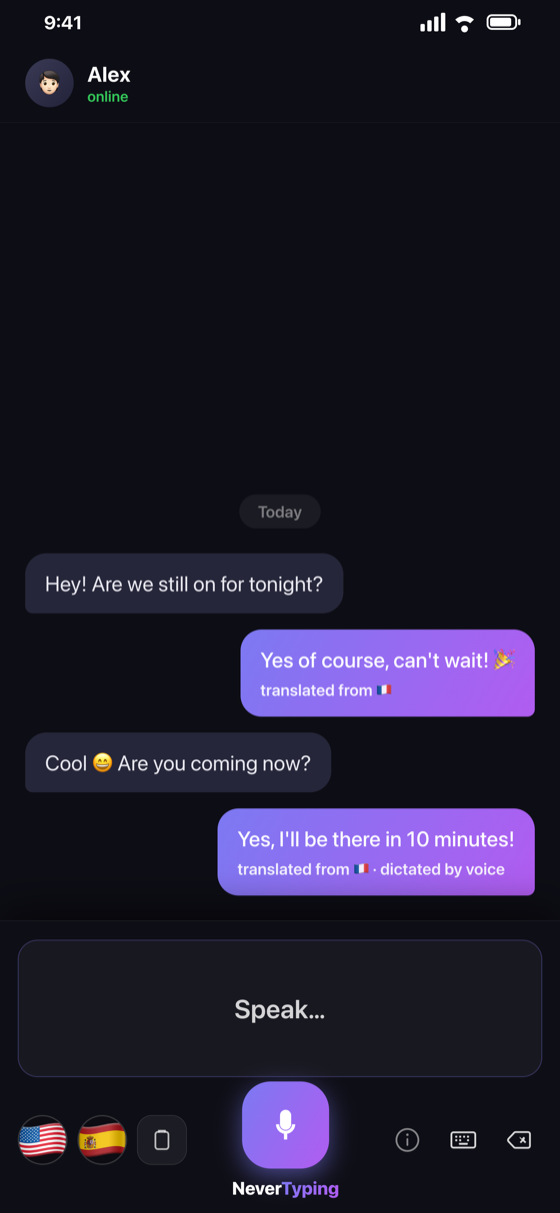
A keyboard that types as you speak and translates on the fly — in WhatsApp, Messages, your emails… everywhere. Hold the mic, speak, slide your thumb to a flag to translate.
Start for free. Pick your plan.
Need unlimited use? Explore the Pro plans.
7 days free, no card · $7.99/month · $59/year · $149 lifetime · Cancel anytime
Compatible macOS 13 (Ventura)+ · Mac Apple Silicon (M1+)
Same transcription quality. Much cheaper. And features they simply don't have.
 Best choice
|
Wispr Flow | Superwhisper | macOS dictation | |
|---|---|---|---|---|
| Pricing | ||||
| Free plan | ✓3,000/wk, forever | ✓ | ✓ | ✓ |
| Monthly | 7,99€ | ~$15 | ~$8.49 | Free |
| Lifetime deal | 149€✓ | — | $249.99 | — |
| ⚡ Key features | ||||
| Translating iPhone keyboard | ✓available | ✗ | ✗ | ✗ |
| 100% local & private | ✓ | ✗ cloud | ✗ cloud | ✓ |
| Right-click → dictate | ✓ | ✓ | ✗ | ✗ |
| Auto-send (Enter) | ✓ | ✗ | ✗ | ✗ |
| Hands-free mode | ✓ | ✓ | ✗ | ✗ |
| Real-time translation | ✓ | ✓ | ✗ | ✗ |
| Hover to translate | ✓ | ✗ | ✗ | ✗ |
| Offline | ✓ | ✗ | ✗ | ✓ |
| 100 languages | ✓ | ✓ | ✓ | ✗ |
| Public mode (filters background noise) | ✓ | ✗ | ✗ | ✗ |
| 100% private history on your Mac | ✓ | ✗ cloud | ✓ | ✗ |
Indicative comparison based on public pricing. Prices in USD.
Creating content? Recommend NeverTyping to your community and earn a commission on every sale.
Estimate based on 30% of a lifetime sale at $149.
No Store, no wait. Download the app and start dictating — like a real Mac app.
Get the .dmg file directly from this site.
Open the .dmg and drag NeverTyping into the Applications folder.
macOS may show a security alert. Right-click the app → Open → Open. Only once.
On first launch, allow microphone and accessibility access. Done — you can dictate everywhere.
What early users are saying.
Yes. The trial is a full 7 days — no credit card required. After that, a free plan stays available forever: 3,000 characters per week (~500 words). For unlimited dictation, choose a plan: $7.99/month, $59/year, or $149 for lifetime access. Cancel anytime.
100%. Everything is transcribed on your Mac by Apple’s Neural Engine. No audio, no text is sent online — nothing leaves your computer.
Anywhere you can type: Mail, Slack, Notion, Messages, your browser, your code editor… If a text field accepts keyboard input, it accepts NeverTyping.
That’s what allows detecting the held right‑click and pasting text into any app. This permission stays on your Mac and sends no data.
100 languages — French, English, Spanish, Portuguese, German, Italian… — with translation to English on the fly.
No. You download the app directly from this site, like a professional Mac app. No Store, no waiting for approval.
Yes, perfectly normal for an app downloaded outside the Mac App Store. To open it: right-click NeverTyping.app → «Open» → click «Open» in the dialog. macOS remembers your choice — you only do this once.
NeverTyping runs on any Apple Silicon Mac (M1 or newer) with macOS 13 or later. 8 GB of RAM is enough (16 GB recommended for the most accurate model), and the app automatically picks the best model for your Mac. On first launch it downloads the AI model (~600 MB) — an internet connection is needed that one time only; after that, everything is 100% offline.